
What is Kantahe?
Commercial karaoke boxes lock you into their catalogue, their remote and their screen. Kantahe is the opposite: one small program on a computer you already own — a NAS, a mini PC, a Raspberry Pi-class arm64 board, a Mac — that serves a karaoke app to every device in the house.
The server is a single static binary with the web app inside, for Linux, macOS and Windows on amd64 and arm64, plus a multi-arch Docker image. Your data is a SQLite database and plain files. There is no cloud, no subscription and no account outside your own server.
- Open source (MIT)
- Self-hosted
- Single binary
- Docker
- Browser, phone & TV
- No songs shipped
Features
Your songs, two formats
.kar (MIDI with lyrics) and .karmp3 (MP3 with timed lyrics), uploaded in the browser or scanned from folders. Every song gets a number you can type on a number pad, with MP3/MIDI badges.
A queue per person
Everyone signs in and has their own queue, favourites, history and playlists. When a queue runs dry, a random song plays.
Play here
"Play here" moves the singing to the device in your hand; your other devices become remote controls for it.
Lyrics & score
Words light up as they are sung, with count-in dots before each line. A score screen and fanfare follow every song — random for fun, or by how loudly you sing into the microphone.
Guide vocals & tempo
Songs with a vocals track can switch the singer's voice on and off. Amateur singer mode plays the guide for the first lines of a song. Tempo goes from 75% to 125% without changing pitch.
MIDI on weak devices
The browser synthesizes MIDI itself; a TV or an old phone can use a lighter mode or let the server render the audio instead.
Background videos
The admin uploads H.264 MP4 clips that loop silently behind the lyrics. Each device can switch them off.
Found on your LAN
The server announces itself over mDNS (_kantahe._tcp), so the apps find it without typing an address.
How a karaoke night works
- The admin sets up the house. The first visit creates the admin account. The admin creates everyone else's account, decides who may upload, and resets forgotten passwords.
- The TV signs in with a code. No typing passwords on a remote: the TV shows a short code and someone approves it from their phone.
- Everyone queues from their phone. Search, browse by letter, punch in a song number, or play from favourites and playlists.
- The screen sings, the phones steer. Volume, vocals and tempo live on the Queue page of any device, not on the player — so nothing on the big screen moves while you sing.
Install the server
Docker (quickest)
git clone https://github.com/andrewloable/kantahe
cd kantahe
# edit the path of your karaoke folder in deploy/compose.yaml, then
docker compose -f deploy/compose.yaml up -d
Open http://localhost:8080 and create the first (admin) account. The image is ghcr.io/andrewloable/kantahe (linux/amd64 and linux/arm64), runs as an unprivileged user, and keeps its data in a named volume. Mount your songs at /library, with :ro if admins shouldn't be able to delete from it.
For the apps to discover the server over mDNS, run the container with network_mode: host (Linux) or on a macvlan network, and set KANTAHE_NAME — announcements don't leave Docker's default bridge. Nothing breaks without it; the apps simply ask for the address.
A single binary
Download kantahe-VERSION-OS-ARCH for your system from the releases page, check it against SHA256SUMS, and try it:
kantahe --data ./data --library ~/Music/KaraokeThe repository has ready-made service files for systemd (sandboxed to its data and library folders), launchd on macOS, and instructions for a Windows service with sc.exe. kantahe --help lists every flag.
Adding songs, backups, upgrades
- Songs: admins upload
.kar/.karmp3files or ZIPs of them under Admin → Upload (50 MiB per file by default, adjustable), or drop them in a--libraryfolder, which is rescanned every ten minutes. - Backups: stop Kantahe and copy the data folder. Its
cachesubfolder can be skipped. Admin → Transfer moves everything to another server without a shell on the old one. - Upgrades: replace the binary (or pull the image) and restart; the database upgrades itself. Back up first — downgrades aren't supported.
HTTPS, your LAN, and what plain HTTP can't do
Kantahe listens on port 8080 over plain HTTP. That is fine for MP3 songs at home, but browsers give two features only to HTTPS pages and localhost: the microphone, and the AudioWorklet the in-browser MIDI synthesizer needs.
| Feature | http://192.168.x.y:8080 | HTTPS via reverse proxy |
|---|---|---|
| MP3 (.karmp3) songs | Play normally | Play normally |
| MIDI (.kar) songs | Switch to server-rendered audio automatically | Synthesized in the browser |
| Microphone scoring | Not offered | Available |
For the full experience, or for any use outside your home network, put Caddy or nginx with HTTPS in front and pass --public-url and --trusted-proxies. The repository's reverse-proxy guide has both configs.
Phones, TVs and old Android boxes
| Where | What |
|---|---|
| Any browser | The web app, served by the server itself. Installable as an app from the browser menu, including on iPhone and iPad via Safari's Share → Add to Home Screen. |
| Android, iOS, Android TV | A Flutter app with native screens and the web player inside (in the repo's app/ folder). |
| Samsung & LG TVs | The web app packaged for Tizen and webOS (tv/), installed in developer mode. |
Android TV with an old WebView
The Android TV app shows the player in the system WebView, and the player needs Chromium 74 or newer. If a box is too old, the app says so and shows the version. Chromium 74–84 (typically Android 10 and 11 boxes) needs nothing: the server automatically sends those engines a second, older build of the player. Chromium 85+ gets the normal player. Below 74 (Android 9 and older), update the WebView from the Play Store or use another device.
The project's docs/tv-android-webview.md also documents replacing the WebView on engineering-build boxes signed with Android's public test keys. That changes the TV's system software — only on your own device, keeping the rollback command.
Kantahe Maker: make your own karaoke files
Kantahe Maker is a free desktop app for macOS, Windows and Linux. Pick a song and it takes the vocals out, finds the lyrics, lets you time them by tapping along, and saves it all in one .karmp3 file that Kantahe plays. Everything happens on your own computer — your music is never uploaded.
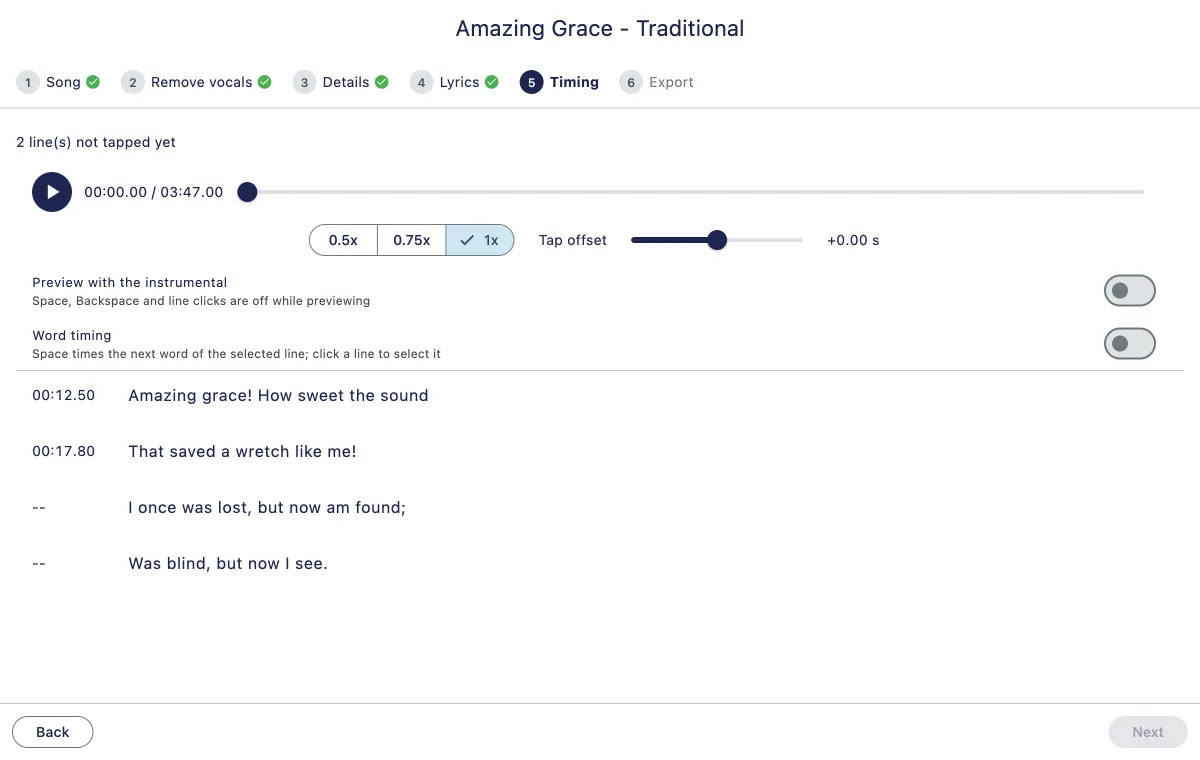
Six steps, one screen each
- Song. Pick an audio or video file:
.mp3,.mp4,.m4a,.mkv,.webm,.wavor.flac. - Split vocals. AI models separate the singer from the music in the background while you carry on. On Windows, an optional switch runs it on the graphics card (NVIDIA, AMD or Intel via DirectML) — one 4:12 test song went from about 104 s to 47 s on an RTX 3080.
- Details. Title and artist come from the file name; composer and lyricist come from MusicBrainz matches. If nothing is found, it retries with title and artist swapped.
- Lyrics. Pick a result from LRCLIB (some come already timed) or paste your own.
- Timing. Press Space as each line starts, or switch on Word timing to time every word. Backspace undoes; you can type exact times or shift the whole song by a number of seconds.
- Export. Preview the result, tick Include the vocals if you want a player to be able to switch the singer on, and save the
.karmp3.
To change a file you made before, Open .karmp3 brings back its details, lyrics and times without splitting again.
Optional: automatic word timing with AI
Auto-time with AI sends only the split vocals to Cloudflare Workers AI (Deepgram Nova-3), which says when each word starts. The app aligns the words with your lyrics, times every word 200 ms early so singers can react, and offers to add words that are sung but missing. It uses your own free Cloudflare account (an Account ID and a Workers AI API token), asks before every send, and gives a good first draft rather than a perfect one.
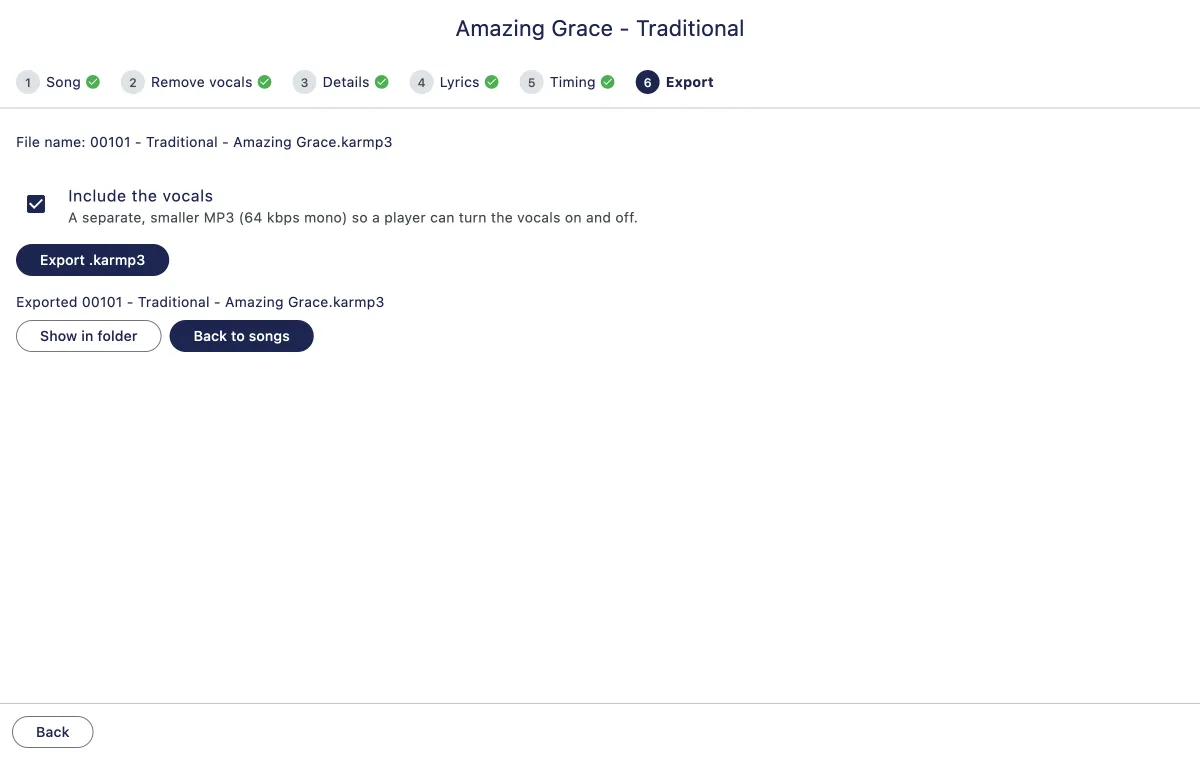
.karmp3, optionally with the vocals as a separate track.Download
- macOS 12+ (Apple silicon and Intel): unsigned, so right-click the app and choose Open the first time.
- Windows: SmartScreen warns about unsigned apps — More info, then Run anyway.
- Linux: needs
libmpv2orlibmpv1.
On first use the app asks before downloading its tools (ffmpeg, Python with the vocal-splitting software, and the model): about 1.4 GB, once. Besides that, it sends only titles and artists to musicbrainz.org, lrclib.net and lyrics.ovh, and each step shows what it sends.
The .karmp3 format, for developers
A .karmp3 is an open, documented format: a ZIP archive with entries in a fixed order, so anyone can write a player, converter or editor for it.
| Entry | Content |
|---|---|
NAME.mp3 | The instrumental: 44.1 kHz stereo, 96 kbps constant bitrate, about −16 LUFS |
NAME.lrc | Lyrics timed by line ([mm:ss.xx]) and optionally by word (<mm:ss.xx>) |
NAME.nfo | Aligned Key : value rows: title, artist, duration, vocals model, timing source… |
NAME.vocals.mp3 | Optional: the vocals alone, 48 kbps mono, same length and start as the instrumental |
[ti:Amazing Grace]
[ar:Traditional]
[00:12.50]Amazing grace, how sweet the sound
[00:23.10]<00:23.10>I <00:23.40>once <00:23.80>was <00:24.10>lost,
Why constant bitrate? A browser's audio element seeks in a variable-bitrate MP3 up to about 1.4 s away from the asked time while still reporting the asked time (measured in Chromium), so vocals and lyrics drift after every seek. Version 1.2.0 wrote VBR files and 1.2.1 went back. The full specification, with reading and writing steps and regexes, is in the Kantahe Maker README, checked against the code by a test.
Honest status
- The server, web app, and Android and iOS apps are built and tested, including against a real server in an emulator.
- The TV packages (Android TV, Samsung, LG) have run on emulators and in a desktop browser, not yet on real TVs. Which TV models play MIDI songs without dropouts is still to be measured.
- Release downloads are server binaries. The native phone and TV apps are built from source today; the web app installs from the browser on any device.
- Kantahe Maker builds are unsigned on all three desktop platforms, and the app does not support screen readers (the Flutter engine can crash on macOS when one is running).
Frequently asked questions
What is Kantahe?
A free, open-source (MIT) self-hosted karaoke server. Install it on any computer or Docker host, add your own .kar and .karmp3 songs, create accounts for the people at home, and everyone sings from a browser, a phone or a TV — a queue per person, and any of their devices as the screen.
Does Kantahe come with songs?
No. You bring your own karaoke files. Kantahe Maker makes .karmp3 files from songs you have the right to use.
How do I install it?
With Docker: edit the library path in deploy/compose.yaml, run docker compose -f deploy/compose.yaml up -d, open http://localhost:8080 and create the admin account. Or run the single binary for Linux, macOS or Windows with --data and --library — see Install the server.
Why does it need HTTPS for some features?
Browsers only give the microphone and the AudioWorklet (used by the MIDI synthesizer) to HTTPS pages and localhost. Over plain HTTP on your LAN, MP3 songs play normally, MIDI songs use server-rendered audio, and microphone scoring is off. A reverse proxy with HTTPS unlocks everything.
Can I sing on a TV?
Yes — in any modern TV browser, with the Android TV app, or with the Samsung and LG packages in developer mode. A TV signs in with a short code approved from a phone. Chromium 74–84 TVs automatically get a legacy build of the player.
What is Kantahe Maker?
A free desktop app for macOS, Windows and Linux that splits the vocals from a song on your computer, finds the details and lyrics, lets you time them by tapping along (by line or by word), and exports a .karmp3 — optionally with the vocals as a separate, switchable track.
Does Kantahe Maker upload my music?
No. Vocal splitting is local; lookups send only title and artist. The single exception is the optional Auto-time with AI, which sends the vocals to your own Cloudflare Workers AI account after you confirm, each time.
What is a .karmp3 file?
A ZIP holding the instrumental MP3, an .lrc with line or word timing, an .nfo with song details, and optionally a vocals MP3. The format is open and fully specified.