
What is flutter_pear?
flutter_pear is a Flutter plugin that gives Dart code the full Pear peer-to-peer stack. Pear (Bare + Hyperswarm + the Hypercore family) is a complete toolkit for building apps with no servers and no central authority. Its native surface is JavaScript. flutter_pear puts a typed Dart API in front of it, so a Flutter developer gets Pear's guarantees with Flutter's ergonomics: Futures for calls, broadcast Streams for events, Uint8List for bytes.
The design principle is one sentence: all P2P logic runs in JavaScript inside a bundled Bare worklet, and your Dart code is a typed remote control. The worklet ships prebuilt inside the plugin, Pear.start() boots it for you, and you never see the JS. Even errors travel: a JS exception inside the worklet is serialized into a typed Dart PearException rather than vanishing on the far side of the bridge.
- Open source
- MIT licensed
- On pub.dev
- 5 platforms
- No server
- E2E encrypted
Why serverless P2P at all?
Most "realtime" Flutter apps route every byte through infrastructure you rent: a Firebase project, a websocket server, a TURN relay. That means a bill that scales with your users, a company that can read or lose their data, and an app that stops working the day the backend does.
A Pear app has none of that. Two devices that agree on a topic find each other through a distributed hash table, punch a hole through their NATs, and speak directly over an end-to-end-encrypted connection. There is no server in the data path to pay for, subpoena, or take down.
No backend to run
No signalling server, no TURN relay, no database. Hyperswarm's DHT introduces the peers; after that they talk directly.
Encrypted by default
Connections are end-to-end encrypted at the transport layer. There is no plaintext hop through a middlebox because there is no middlebox.
Local-first
Every Pear data structure works fully offline. Writes hit your local copy immediately; syncing with a peer is a separate, explicit step.
A real data layer
Not just a socket: append-only logs, key/value stores, file drives, and multi-writer sync all replicate over the same connection.
Pure Dart surface
Futures, Streams, and Uint8List. No platform channels to hand-roll, no JS interop, no Kotlin or Swift.
Five platforms, one codebase
Android, iOS, macOS, Linux, and Windows — the same Pear.start()/join() code, no platform branching for the happy path.
flutter_pear vs. WebRTC vs. Nearby Connections
The three usual answers to "how do I connect two Flutter devices" solve genuinely different problems. The honest comparison:
| flutter_pear | WebRTC (flutter_webrtc) | Nearby Connections | |
|---|---|---|---|
| Server needed? | None — DHT introduces peers | Signalling server, usually STUN/TURN too | None |
| Range | Open internet | Open internet | Local proximity only (Bluetooth / Wi-Fi Direct) |
| Encryption | End-to-end by default | DTLS/SRTP, but signalling is yours to secure | Transport-level |
| Data layer | Logs, KV store, file drive, multi-writer sync | Raw data channels only | Raw byte/stream payloads only |
| Best for | Serverless, offline-first, E2EE apps that sync real data structures between users anywhere | Audio/video calls, low-latency media | Same-room device-to-device transfer |
The short version: pick WebRTC when you need media, Nearby when peers are in the same room, and flutter_pear when you want two users anywhere to share data with no backend between them.
Quick start: P2P chat in about 20 lines
Requires Flutter SDK 3.24 or newer (which bundles Dart 3.5+).
flutter pub add flutter_pearNative binaries and the P2P runtime resolve automatically — Gradle on Android, SwiftPM on iOS, and a committed per-OS bundle on desktop. There is no manual NDK, ABI, or Podfile editing on any platform.
Two devices that share a topic find each other over the internet and exchange end-to-end-encrypted messages, with no server:
import 'dart:convert';
import 'package:flutter_pear/flutter_pear.dart';

final pear = await Pear.start();

// A topic is a 32-byte rendezvous key both peers agree on out of band.
// unsafeTopicFromString is a GLOBAL, demo-only shortcut -- every device
// worldwide using the same string lands in the same room. Real apps
// derive a topic from a PearPairing invite instead.
final topic = PearCrypto.unsafeTopicFromString('my-secret-room');
final swarm = await pear.join(topic);

swarm.connections.listen((PearConnection conn) {
  conn.data.listen((bytes) {
    print('peer: ${utf8.decode(bytes)}');
  });
  conn.write(utf8.encode('hello from Flutter'));
});

// ... later
await swarm.leave();
await pear.dispose();
Show the user what's actually happening
A swarm that hasn't connected yet is the single most confusing state for a user. Don't show a spinner that never explains itself — listen to the state stream:
// currentState is readable the instant join() returns -- a plain broadcast
// Stream can't replay a past transition to a late subscriber, so read this
// first, then keep listening to `state` for what happens next.
print('state: ${swarm.currentState.state}');
swarm.state.listen((status) {
  final reason = status.error != null ? ' (${status.error})' : '';
  print('state: ${status.state}$reason');
});
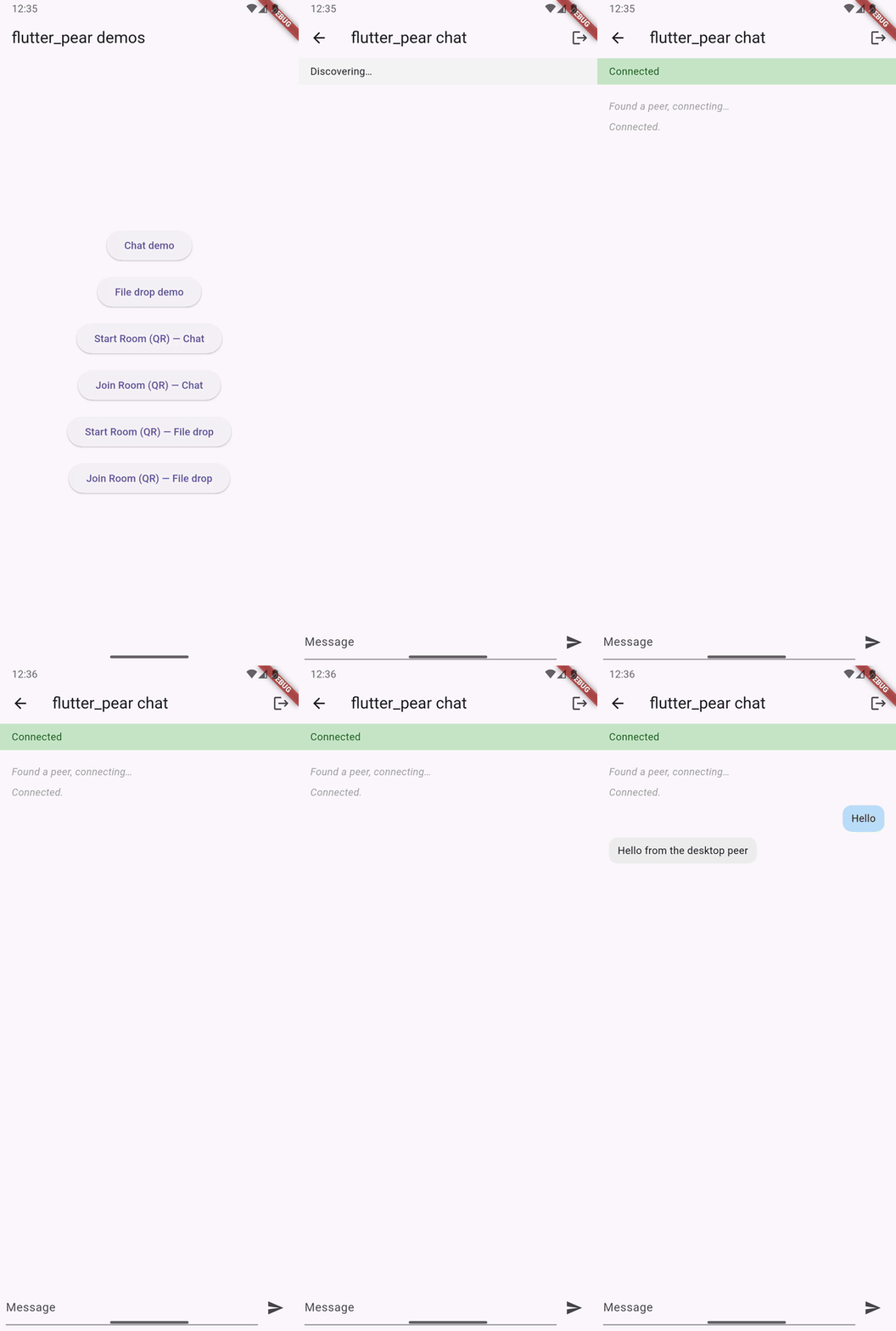
Expected output on each device, once the other side joins and the first message arrives:
state: PearSwarmState.discovering
state: PearSwarmState.connecting
state: PearSwarmState.connected
peer: hello from Flutter
A hostile network (UDP blocked by a firewall, a carrier NAT that can't hole-punch) makes state emit PearSwarmState.failed with a typed reason instead of hanging forever. That's an expected outcome, not a bug — surface status.error to the user.
API coverage
Every capability below has a complete Dart wrapper and a complete, real pear-end JS implementation — no stubs. The status column is deliberately precise about what has been proven on real hardware versus what is tested against the in-memory fake and exercised against the real worklet.
| Capability | Dart class | Status |
|---|---|---|
| Worklet lifecycle | BareWorklet | Real-hardware confirmed on all five platforms — boots, attaches, suspends/resumes, terminates cleanly |
| Discovery + encrypted connections (Hyperswarm) | PearSwarm, PearConnection | Real-hardware confirmed — a live chat round trip reaching connected on both sides |
| Keypairs, topics, hashes | PearCrypto | SHA-256 topics/hashes implemented; per-device keypairs not yet exposed (PearPairing covers real key exchange for invites) |
| Append-only logs (Corestore / Hypercore) | PearStore, PearCore | Implemented, fake-tested + real-worklet exercised; per-wrapper two-device replication proof pending |
| Key/value store (Hyperbee) | PearBee | Implemented, fake-tested + real-worklet exercised; per-wrapper two-device replication proof pending |
| File drive + mirror-to-disk (Hyperdrive) | PearDrive | Implemented, fake-tested + real-worklet exercised; per-wrapper two-device replication proof pending |
| Multi-writer sync (Autobase) | PearBase | Implemented, fake-tested + real-worklet exercised; per-wrapper two-device replication proof pending |
| Invites / device linking (blind pairing) | PearPairing | Implemented, fake-tested + real-worklet exercised; per-wrapper two-device replication proof pending |
"Per-wrapper two-device replication proof pending" is narrow and specific: the transport underneath every row is real-hardware confirmed, and the automated test suite for every row is green today. What hasn't been individually demonstrated is each data structure converging across two physically separate devices.
The data structures, and how replication works
Every Pear data structure is local-first: it works fully offline, and syncing with a peer is a separate, explicit step. The pattern is identical no matter which structure you use:
- Connect. Both peers join the same topic and get a
PearConnectionto each other. - Replicate. Both peers call
.replicate(connection)on the same data structure (same name or key). Order doesn't matter, and it's no-op-safe to call again on every new connection. - Write freely. From then on, writes on either side flow to the other automatically over that one connection, for as long as it stays open.
Replication only moves data — it never blocks a local read or write. PearCore.append, PearBee.put, and PearDrive.put all succeed immediately against your own local copy whether or not a peer is currently connected.
File sync with PearDrive
PearDrive moves bytes by local file path, never in-memory, so a multi-hundred-megabyte transfer can't blow up memory the way pushing raw bytes through JSON would.
final drive = await pear.drive(name: 'shared-files');

// Replicate this drive with every peer that connects -- both sides call
// this the same way, order doesn't matter, and it's safe to call again on
// a fresh connection after a reconnect.
swarm.connections.listen((PearConnection conn) {
  drive.replicate(conn);
});

// Add a local file to the drive under a virtual path.
await drive.put('/notes.txt', '/local/path/to/notes.txt');

// Once a peer has replicated their side, pull one of their files to disk.
if (await drive.exists('/shared/photo.jpg')) {
  await drive.get('/shared/photo.jpg', '/local/path/to/downloaded-photo.jpg');
}
To sync a whole folder, drive.mirrorToDisk(localDir) mirrors the entire drive in one call — only changed files actually copy, so calling it repeatedly (on every replication update, say) is cheap:
final result = await drive.mirrorToDisk('/local/path/to/synced-folder');
print('added ${result.added}, changed ${result.changed}, removed ${result.removed}');
Topics vs. invites — read this before you ship
Every swarm join starts from a 32-byte topic, a rendezvous key both peers agree on out of band so Hyperswarm's DHT can introduce them. How you get that topic is the one decision most likely to bite you.
unsafeTopicFromString — demo only
It hashes a human-chosen string into a topic, deterministically. Which means every device on earth that calls it with the same string lands in the same swarm. There is no way to scope it to just the peers you intend, and it's called unsafe for exactly that reason — the name is the warning, so it can't be missed even by someone who skips the docs. Fine for a two-device demo where you control both ends. Never fine for anything a real user picks or shares, because you cannot un-leak a topic once it's guessable.
PearPairing invites — the real answer
One device creates an invite, shares it out of band (a QR code, a short code read aloud, a deep link — flutter_pear doesn't care which), and the other device accepts it. The invite is scoped to that one pairing session, and the confirmed key it produces is private to the two devices that actually paired — not a string anyone could type in and join.
// Device A -- create the invite
final invite = await pear.createInvite();
invite.candidates.listen((candidate) async {
  final sharedTopic = PearCrypto.unsafeTopicFromString('paired-room');
  await candidate.confirm(sharedTopic);
  final swarm = await pear.join(sharedTopic);
  print('paired -- joined shared topic ${swarm.topic.hex}');
});

// Encode invite.invite as a QR code and show it to the other device.
final inviteBytes = invite.invite;

// Device B -- accept it
final sharedTopic = await pear.acceptInvite(scannedInviteBytes);
final swarm = await pear.join(sharedTopic);
Rule of thumb: if a human is going to type the same string into two phones, you're in unsafeTopicFromString demo territory. If the two devices have never met and need to be introduced by your app, use a PearPairing invite.
All five platforms
Android, iOS, macOS, Linux, and Windows. On mobile, flutter_pear links Bare Kit's worklet in-process. There is no Bare Kit build for desktop, so the desktop hosts spawn the real bare CLI runtime as a subprocess and relay the same raw binary IPC over its stdin/stdout. Your Dart code never sees the difference and the wire protocol is identical — a desktop peer and a phone talk to each other with no special casing.
| Platform | Runtime model | Setup beyond pub add | Background execution |
|---|---|---|---|
| Android | Bare Kit worklet, in-process | None | OS-suspended; ship arm64-v8a/x86_64 splits |
| iOS | Bare Kit worklet, in-process | One copy-paste NSLocalNetworkUsageDescription block in Info.plist | OS-suspended; no extended background execution |
| macOS | bare CLI subprocess | Three gates — dart run flutter_pear:doctor --fix applies all of them | Unrestricted |
| Linux | bare CLI subprocess | None | Unrestricted |
| Windows | bare CLI subprocess | None | Unrestricted |
macOS needs three things a fresh flutter create won't give you
A new macOS app will not even build flutter_pear until the App Sandbox is disabled (it unconditionally blocks spawning the bare subprocess), NSLocalNetworkUsageDescription is added (macOS 15+ silently drops LAN traffic without it, with no prompt), and the deployment target is raised to 10.15.4+ (flutter create defaults to 10.15, one patch below the minimum, and the failure is a raw SwiftPM error that names no flutter_pear file at all). One command applies all three, idempotently:
flutter create --platforms=macos .    # or: linux, windows
dart run flutter_pear:doctor --fix    # macOS only -- no-op on Linux/Windows
flutter run -d macos
Desktop gives you one thing free: no background suspension
Pear.platformInfo.backgroundExecution reports unrestricted on desktop, so PearLifecycle defaults to manual there and minimizing a window doesn't drop your swarm. Branch your app's behavior on that property, not on a platform check — it reports the real constraint on mobile and unrestricted on desktop, so you write the policy once.
The bare runtime is fetched automatically on first launch on all three desktop platforms (checksum-verified, then cached). npm i -g bare is a manual fallback only, not a requirement.
Two gotchas that will cost you an afternoon
1. "It just sits at discovering" — it's your router, not the library
The single biggest source of wasted debugging time is NAT hairpinning. Many routers won't loop a device's own traffic back to a sibling behind the same NAT, which breaks the UDP hole-punching that Hyperswarm's DHT discovery relies on. So two emulators, or any two processes on one machine, will fail to connect — and it is not a flutter_pear bug.
| Test setup | Result | Why |
|---|---|---|
| Phone ↔ desktop, different machines | Works | Real interactive chat, both directions, two genuinely separate devices |
| Desktop ↔ remote server (separate public IP) | Works | connected on both sides, sustained, messages arriving cleanly |
| Emulator ↔ desktop peer, same machine | Unreliable | Worked in earlier testing, later failed reproducibly — don't trust it as a signal |
| Two peers behind the same NAT | Fails | NAT hairpinning. The doctor's own loopback self-test fails identically with zero flutter_pear code involved (two plain Node peers) — which is how this got root-caused |
The rule: test across two genuinely separate machines or networks. Run the doctor first — if its loopback self-test fails, same-machine testing will fail too:
dart run flutter_pear:doctorRun it from your own app's root, not from inside the flutter_pear package. It checks real Hyperswarm DHT bootstrap reachability, gives a NAT/firewall estimate, and runs a local two-process loopback self-test, printing [PASS]/[FAIL]/[INFO] per check and naming the blocker on a UDP-blocked network instead of shrugging.
2. A phone whose screen locks mid-handshake looks exactly like a broken connection
Each suspend/resume cycle resets that side's swarm back to discovering, and a real DHT lookup can take 30 seconds or more — so a locking screen can starve it forever. That's the designed lifecycle behavior, not a bug. Keep the screen on during a first connect.
Honest status
flutter_pear is under active, incremental development. The breakdown of what actually runs versus what's still ahead:
- The worklet is real, not a stand-in.
Pear.start()boots an actual Bare runtime running the bundledpear-endJS — not a native echo. - Real chat round trips are confirmed on real hardware, through the example app's own Dart API: macOS ↔ a physical Android phone, macOS ↔ a remote Linux server on a genuinely separate public IP, and Linux/Windows ↔ macOS. All reached
connectedon both sides with real messages arriving. - Every capability has a complete implementation, exhaustively unit- and e2e-tested against the in-memory fake (every happy path and every typed error path), plus real-worklet validation.
- The honest remaining gap: each data-structure wrapper's own "does two-device replication actually converge on real hardware" question was answered against the fake and the real worklet, but not yet against two physically separate devices per wrapper. The transport layer everything rides on is real-hardware confirmed.
- iOS is simulator-validated by standing decision. The worklet boots and runs on the iOS Simulator against the real committed bundle, verified with a live simulator-iOS ↔ physical-Android round trip. Physical-iPhone validation is a documented follow-up, not a release gate.
Testing your own app doesn't need radios or real peers: flutter_pear_test ships in-memory fakes for the full API — swarm, Corestore/Hypercore, Hyperbee, Hyperdrive, Autobase, and blind pairing.
Frequently asked questions
What is flutter_pear?
A free, open-source Flutter plugin that exposes the full Pear peer-to-peer stack (Bare, Hyperswarm, and the Hypercore family) through a typed, Dart-idiomatic API. It lets you build serverless, end-to-end-encrypted P2P apps — discovery, encrypted connections, append-only logs, key/value stores, file drives, and multi-writer sync — without writing any Kotlin, Swift, or JavaScript. It's MIT licensed and published on pub.dev at v0.3.1.
How does Flutter peer-to-peer networking work without a server?
Two peers agree on a 32-byte topic out of band. Hyperswarm's distributed hash table uses that topic to introduce them, then UDP hole-punching establishes a direct, end-to-end-encrypted connection between the devices. No server relays the data and no central authority issues identities — the DHT only performs the introduction. In Dart that's two calls: Pear.start() then pear.join(topic).
How is it different from WebRTC or flutter_nearby_connections?
WebRTC still needs a signalling server to introduce peers, and usually STUN/TURN infrastructure you run or pay for. Nearby Connections is limited to local proximity transports like Bluetooth and Wi-Fi Direct. flutter_pear needs neither: the DHT handles introduction over the open internet with no server you operate, and it ships a full data layer on top rather than just a transport.
Do I have to write JavaScript, Kotlin, or Swift?
No. All P2P logic runs in JS inside a bundled Bare worklet that ships prebuilt inside the plugin, and your Dart code is a typed remote control over a binary IPC bridge. You never see the JS.
Which platforms are supported?
All five — Android, iOS, macOS, Linux, and Windows — with Flutter SDK 3.24+. Mobile links Bare Kit's worklet in-process; desktop spawns the real bare CLI runtime as a subprocess and relays the same binary IPC, so a desktop peer and a phone interoperate with no special casing.
Why does my connection just sit at discovering?
Almost always NAT hairpinning, not a library bug. Many routers won't loop a device's traffic back to a sibling behind the same NAT, breaking the UDP hole-punching that DHT discovery relies on — so two emulators, or any two processes on one machine, will fail. Test across two genuinely separate machines or networks, and run dart run flutter_pear:doctor first: if its loopback self-test fails, same-machine testing will fail identically with zero flutter_pear code involved. The other common cause is a phone screen locking mid-handshake, which resets that side's swarm to discovering.
Is it production ready?
It's pre-1.0 (v0.3.1), so minor versions may break the API without notice — pin an exact version if you depend on it. Worklet lifecycle plus Hyperswarm discovery and encrypted connections are real-hardware confirmed on all five platforms. Every data-structure wrapper is implemented and exhaustively tested, but per-wrapper two-device replication proof on physically separate hardware is still pending, and iOS is simulator-validated rather than physical-device validated.
What's the difference between a topic and a pairing invite?
PearCrypto.unsafeTopicFromString hashes a string into a topic deterministically — so every device on earth using that same string lands in the same swarm. It's demo-only, and named "unsafe" so the warning can't be missed. PearPairing invites are the real answer: one device creates an invite and shares it out of band (QR code, short code, deep link), the other accepts it, and both end up with the same 32-byte key privately, scoped to that one pairing session.